Information Technology
ElevenLabs Explained: A Practical Guide to AI Voices, Speech, Dubbing and Audio Projects
ElevenLabs offers tools for creating and working with spoken audio and other audio material. Its documentation covers text to speech, transcription, voice-related features, dubbing, creative audio and conversational agents. These capabilities can serve very different projects. An audiobook producer, a software team testing a spoken interface and a creator adapting a video for another audience do not need the same workflow or the same review process.
This independent guide starts with the project rather than a voice demonstration. It explains how to prepare a script, compare a voice and model, review generated speech, approach dubbing and evaluate an agent. The examples are fictional working situations, not claims of measured performance. Product names, model availability, language coverage and account conditions can change. Use the current ElevenLabs documentation and the selected product's interface to confirm the features that apply to a real project.
1. Identify whether the task creates, recognises or adapts speech
Text to speech turns written material into audio. Speech to text works in the other direction, producing a transcript from spoken material. Dubbing adapts an existing audio or video performance for another language. A conversational agent adds the further responsibility of responding during an interaction. These tasks can appear together in a production process, but they solve different problems and should be evaluated separately.
Imagine a fictional museum preparing a visitor guide. It might need a narrated introduction from an approved script, a transcript of a recorded interview and a translated version of a short explanatory video. Treat those as three deliverables. Define what must remain accurate in each: the introduction's wording, the interview's meaning and the translated video's explanation. This prevents the team from choosing a tool simply because it produced an appealing voice sample for a different task.
2. Understand the difference between a voice and a model
A voice provides an audible identity or performance character. A model determines important aspects of how a particular capability operates. Choosing a familiar-sounding voice does not establish which model is appropriate for long narration, a short interactive response or another supported task. Review the current choices and their documented trade-offs rather than assuming one configuration is best for every kind of audio.
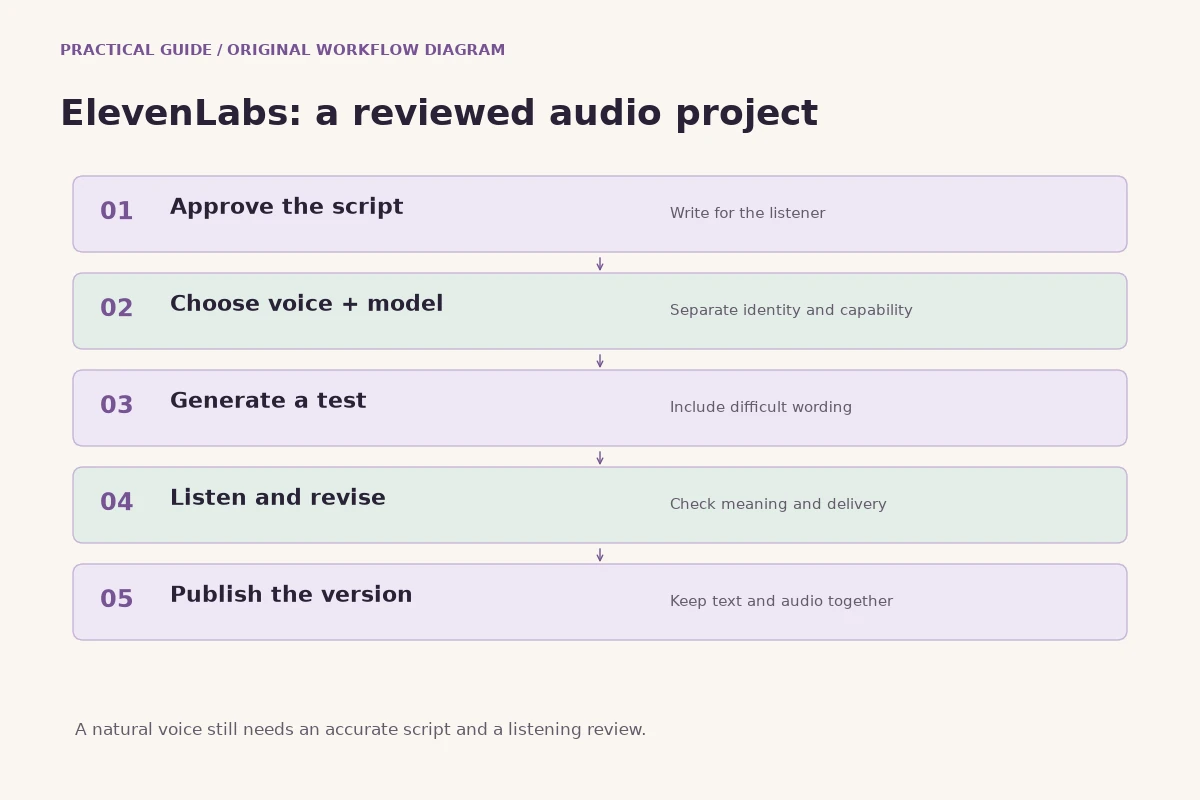
Use a consistent test passage when comparing configurations. Include a normal sentence, a difficult name, a number and a phrase that needs a deliberate pause. Listen for whether the meaning is clear and the delivery suits the intended audience. A dramatic voice may be attractive in a demonstration yet tiring in a long instructional recording. Record the selected voice and model with the project so a later edit can be evaluated against the actual original configuration.
3. Write a script that can be understood without a screen
Spoken information needs its own editing pass. Replace unnecessarily long sentences with a clear sequence of ideas. Introduce unfamiliar terms before relying on them and explain what the listener should do next. A written paragraph may depend on headings, links or a diagram that will not be visible during playback. Decide which of that context belongs in the audio and which should remain available as a separate text resource.
Read the script aloud before generating it. Awkward wording is often easier to hear than to notice while silently reading. Pay particular attention to addresses, dates, abbreviations and product names. If a listener must act on a number or instruction, check that it cannot be misunderstood because of a missing unit or an unclear reference. Script preparation is usually a better starting point than repeatedly regenerating audio from wording that is difficult for a human reader too.
4. Make pronunciation a specific review task
Names and specialist vocabulary deserve deliberate testing. A technically fluent recording can still be unsuitable if it repeatedly mispronounces the organisation, a person's name or an important instruction. Keep a short pronunciation list with the script. Where a product offers a supported pronunciation control or dictionary, follow its current documentation and test the result. Do not assume that an improvised spelling change is harmless when that same text may also appear in captions or a transcript.
Review the word in its actual sentence, not only by itself. Neighbouring words, punctuation and language changes can affect how a phrase sounds. A fictional training team might approve a sentence containing its product name before generating the rest of a course. Save that approved example as a reference. If another editor changes the sentence later, repeat the relevant check rather than assuming the old approval automatically applies to the new phrasing.
5. Use short tests that represent the real recording
A useful test is small enough to review carefully and realistic enough to reveal important problems. A generic greeting says little about a technical lesson, a children's story or a mixed-language announcement. Select a passage that contains the difficult elements of the real script. Include changes in emphasis, a transition between ideas and any terms that are central to the project. Decide what the test is meant to establish before listening.
Keep notes in ordinary language. The delivery may be too hurried for instructions, the pause may separate a word from the phrase it belongs to, or the tone may sound more enthusiastic than the subject warrants. These observations give the next experiment a purpose. Avoid changing every setting at once in response to one problem. First decide whether the script, the voice choice or a supported model control is the most sensible place to make a targeted revision.
6. Plan long narration as an editorial project
Long recordings require consistency across sections. Divide the manuscript at meaningful boundaries and keep a versioned source document. Agree on how headings, repeated terms and transitions should be spoken. A listener should not hear an unexplained change in terminology halfway through a lesson because different sections were prepared from different drafts. Maintain a clear relationship between each script section and its generated audio.
After reviewing individual sections, listen to the joins. A section may sound correct alone while beginning too abruptly beside the previous one. Compare pacing and loudness in the final assembly, and retain enough context for an editor to identify what changed. If one sentence needs regeneration, replace it carefully and review the surrounding audio again. The goal is a coherent recording, not merely a collection of technically successful clips that happen to appear in manuscript order.
7. Review spoken meaning as well as sound quality
A pleasant voice can hide an inaccurate message. Listen for omitted words, changed names, ambiguous numbers and pauses that alter meaning. Compare the audio with the approved script. If the recording will explain an important procedure, have the appropriate subject reviewer check the content rather than relying only on the person who generated it. Clear delivery and correct information are related but separate requirements.
Review on realistic playback devices. A recording that sounds balanced through studio headphones may be less intelligible on a phone speaker in a normal room. Check the intended placement, including any music or video that will accompany it. Where practical, provide the information in text as well. The review should ask whether the intended listener can understand the message and act on it, not only whether the audio sounds impressive in an isolated demonstration.
8. Approach voice creation and cloning with clear permission
A recognisable voice can carry a person's identity and implied endorsement. Before using recordings to create or imitate a voice, establish that the material and intended use are authorised. Review the product's current requirements and the project's permission process. Do not assume that finding a recording online creates permission to reproduce the speaker in a new context. A technical capability and an authorised use are different matters.
Keep the permission record connected with the project. It should be possible to understand what was approved and who may use the resulting material without searching through informal messages. If the scope changes from an internal prototype to public advertising, review the new use before publication. This guide does not decide a particular rights question; it recommends making the decision explicit rather than letting an attractive sample quietly become a public representation of someone who never agreed to that representation.
9. Treat dubbing as adaptation, not just replacement audio
Dubbing aims to make an existing performance understandable in another language. The task involves meaning, timing and the relationship between speech and the original visual material. ElevenLabs documents dubbing workflows for audio and video, with options that vary by product and model. Confirm the workflow you intend to use and review its current editing capabilities before planning a production schedule around a particular feature.
Prepare a clear source and an accurate account of what is being said. In a fictional educational video, a translator may need to preserve the explanation of a diagram while using natural wording for the new audience. Literal word replacement can produce an awkward or misleading lesson even when the voice sounds convincing. Judge the adapted version as a complete communication. The intended viewer should understand the same important ideas without needing knowledge of the original language to fill in missing context.
10. Review each dubbed language on its own terms
A language version needs a real language review. Names, measurements, technical terms and cultural references may require an explicit editorial choice. A sentence can be grammatically possible while sounding unnatural or conveying the wrong emphasis. Ask a suitable reviewer to compare meaning and usability, and keep a record of corrections. A fluent-sounding generated voice is not evidence that every translation decision is correct.
Review timing after wording changes. A clearer translation may be longer or shorter than the original sentence, and its placement beside a visual demonstration may need adjustment. Check who is speaking, whether transitions remain understandable and whether the final mix supports the explanation. Keep the approved transcript with the audio version. That makes future updates easier and reduces the risk of reintroducing a machine translation that an earlier review had already corrected.
11. Use transcription as a draft that can be checked
Transcription converts spoken audio into written text. ElevenLabs documents speech-to-text capabilities and model-specific options. An application or editor should confirm which features apply to the selected workflow instead of assuming every transcript includes every kind of timing or speaker information. The first useful question is what the transcript will be used for: searchable notes, captions, a publication draft or another task.
Check critical details against the source recording. Names, unfamiliar terminology, background speech and overlapping speakers can create errors that are easy to overlook in cleanly formatted text. If the transcript will be quoted, review the quoted passage carefully. Distinguish an edited summary from a verbatim record and label it accordingly. A transcript is easier to use when the reader understands whether it preserves the original speech, lightly cleans it up or presents a separate editorial interpretation.
12. Separate background sound from the spoken message
Audio projects often combine voice, music and sound effects. Each element should serve the final experience. A sound effect may clarify an action in a demonstration, while a music bed may establish a mood. Neither should obscure an instruction or imply a real event that the recording does not document. Choose the amount of sound according to the purpose of the piece rather than filling every pause because a tool makes another layer available.
Listen to the complete mix at an ordinary playback level. If a sentence becomes difficult to understand beneath the background, change the arrangement or balance before publication. Keep separate source files for the voice and other audio where the production process allows it. That makes an update more manageable when the script changes. A flexible set of approved components is often more useful than a single finished file whose spoken information cannot be changed without rebuilding the whole soundtrack.
13. Define the purpose of a conversational agent
A conversational agent is different from a prerecorded voiceover because its response depends on an interaction. Define the job before choosing the voice. The agent might explain a known set of product information, collect a limited enquiry or help someone find the appropriate next step. State the limits clearly. An instruction to sound helpful does not define what the agent is authorised to promise or which information it should avoid guessing.
ElevenAgents documentation describes the components involved in voice interaction and the platform's supported configuration approaches. For a real project, review the current setup and test the complete experience. A fictional visitor-information agent could be evaluated on common opening-hour questions, an ambiguous enquiry and a request outside its knowledge. The response should be judged for correctness and usefulness, not just for how naturally the voice handles the exchange.
14. Test turn-taking and interruptions realistically
Conversation has timing requirements that a narration sample does not reveal. A person may pause to think, interrupt an answer or change the question halfway through. Test those behaviours in the environment where the agent will be used. Review whether the interaction feels understandable and whether an interruption causes the agent to lose important context. Use ordinary questions spoken in ordinary ways rather than only a rehearsed demonstration.
Keep a small set of repeatable interaction scenarios. One can involve a short factual question, another a correction and another a request that needs human attention. Record what the system actually did and what the project expected. When a configuration changes, compare the same scenarios again. This turns voice testing into an evidence-based product review rather than a sequence of subjective impressions that cannot be compared after the next update.
15. Build knowledge that an agent can use responsibly
An agent's knowledge should be organised for the task it performs. Remove obsolete instructions, identify authoritative sources and make the handling of missing information clear. If two documents contain different versions of a policy, do not expect a voice interface to resolve the conflict merely because the answer sounds confident. The project needs a decision about which information is current and what should be shared with the intended audience.
Test questions that expose knowledge boundaries. Ask for something that is absent, unclear or outside the role. A useful response can acknowledge a limitation and offer an appropriate next step. Define the handover process in practical terms, including what information should be retained and who receives the enquiry. The important outcome is not that the agent produces an answer to every question. It is that the interaction helps the person without inventing facts or authority the project has not provided.
16. Plan API access around the application's ownership model
API use requires more than putting generated audio on a page. Decide which server component creates a request, which account owns it and how the result is made available to the authorised person. Keep credentials outside public browser code. Validate user-supplied text and settings according to the chosen endpoint and the application's purpose. A public audio form should not become an unrestricted route to arbitrary paid operations.
Review how failures and interrupted connections are represented. Save the evidence needed to distinguish an unsuccessful submission from an accepted request whose result is still pending. Follow the current API documentation for response handling and completion mechanisms. Keep operational messages readable for users while retaining useful technical context for authorised support. An understandable account record makes it easier to investigate a problem than a page that simply asks the user to click the same action again.
17. Budget by the actual capability and account conditions
Different audio tasks can have different billing assumptions. Review the current product, model and account information before estimating a project. A narration budget needs to account for the amount of text and likely revisions, while another workflow may use different measured units. Do not infer a permanent universal rate from one test or from a description of a different product. Keep the estimate tied to the exact operation you intend to use.
Include review work in the plan. An inexpensive generated draft is not automatically an inexpensive finished recording if it repeatedly requires manual repair. Conversely, a small representative test can prevent a much larger unsuitable batch. Record which assumptions were used and revisit them when the manuscript, language set or intended output changes. This gives a team a practical budget discussion without pretending to know the final cost of work that has not yet been specified or completed.
18. Organise versions so updates remain manageable
Save the approved script, relevant voice and model identifiers, generated files and any manual edits in a readable project structure. Label the publication version separately from experiments. If a sentence changes, it should be possible to identify the affected audio without relying on one person's memory. This is especially important for a series of lessons or announcements where similar files may contain different dates, names or instructions.
Keep a short change note with each approved update. It might explain that a pronunciation was corrected, a paragraph was shortened or a policy statement was replaced. Review the surrounding audio after inserting the change. The final product is what the listener hears from beginning to end, and a technically correct replacement can still create an awkward join. Good version management helps a team maintain the recording after the original generation session is long finished.
19. Judge a pilot through the listener's experience
A pilot should involve a real use case with a limited scope. For a fictional language-learning project, that might be one short lesson with an approved script and a clear exercise. Ask whether the listener can follow the explanation, distinguish important words and understand what to do next. Record problems in terms that can lead to changes. A polished voice sample is encouraging, but it does not establish that the educational or communication goal has been met.
Include a comparison with the project's existing process where that helps the decision. The team may value faster revisions, clearer consistency or another concrete benefit. Assess that benefit alongside the quality of the finished audio and the work needed to approve it. A useful pilot can also conclude that a particular task needs human performance or a different production approach. The purpose of testing is to make a sound decision, not to force every project into the same tool.
20. A practical starting plan for an ElevenLabs project
Choose one capability, define the deliverable and prepare representative source material. For narration, begin with an edited script and a test passage that includes difficult wording. For transcription, define how accuracy will be checked. For dubbing, plan language and timing review. For an agent, state the role, knowledge boundaries and handover path. Confirm the current product settings rather than relying on an old example that may describe a different model or workflow.
Then review the result in its final context and retain the approved version with enough information to maintain it. Keep identity permissions, account access and publication decisions explicit. These habits make AI audio work more understandable for the creator, the reviewer and the listener. ElevenLabs provides a range of voice and audio capabilities; the practical value of a project comes from selecting the appropriate one and turning its output into a clear, accurate and properly reviewed experience.
Sources and further reading
Explore technology and API guides
Compare messaging, creative model APIs, voice tools and communication workflows through the other independent Information Technology guides.
Explore Information Technology