Information Technology
fal AI: A Practical Guide to Model APIs, Creative Workflows and Reliable Generation
fal provides a platform for running generative media models through model APIs and related developer tools. A project may begin with an image experiment in a playground and later become an application workflow that accepts inputs, submits a request and presents a completed result. Understanding the difference between a model demonstration and a dependable product is essential. The attractive output is only one part of the work; the surrounding application must also handle ownership, completion, errors and useful creative review.
This independent guide explains how to evaluate fal for an image, video or other supported media task. It uses fictional project examples and general engineering recommendations alongside the platform's documented API concepts. Model capabilities, access conditions and pricing vary by endpoint and can change. Consult the selected model's current documentation before building around a specific field or output. No workflow described here should be interpreted as a guarantee that every model accepts the same inputs or produces the same kind of result.
1. Understand the platform, the model and the endpoint
A platform, a model family and a particular API endpoint are different things. The platform provides the environment and interface through which work can be requested. A model family describes a related set of capabilities. An endpoint identifies a specific callable operation with its own contract. A familiar family name is therefore not enough to define a request. You need the correct endpoint and the documented input structure for the operation you intend to perform.
This distinction prevents a common planning mistake: treating every entry in a catalogue as an interchangeable image or video generator. One operation may create new material, another may edit an input and another may perform a specialised transformation. Compare the required source files, supported controls and output description before writing application code. Keep the endpoint identifier in your project notes with the documentation you reviewed. A clear record of the chosen operation makes later maintenance easier than a note that merely says to use the newest model.
2. Start with one concrete creative task
Define what the application should help someone produce. A fictional furniture studio might need several background concepts for one approved product photograph. Its first requirement is preserving the product while exploring surroundings, not generating an unrelated room from scratch. That brief suggests an editing-oriented evaluation. Another team may want an entirely new illustration from a written description. These projects need different test material even if both eventually produce an image file.
Write down what would make an output unacceptable. Changed branding, an incorrect object count or an unsuitable crop may matter more than subtle differences in visual style. Use those criteria to select a small evaluation set. A useful test set contains ordinary examples and at least one difficult case, rather than only the reference image that already worked well in a demonstration. You are deciding whether a workflow fits a real need, not trying to make a catalogue comparison produce a universal winner.
3. Read the model contract before designing the form
An API contract describes the inputs and outputs that your application must handle. Review required fields, data types, permitted values and any stated file requirements. A prompt field, an image URL and an output-size selector may look simple in a playground, but they carry assumptions that should be reflected in the application. The person using your form should understand what material is needed and which choices meaningfully affect the requested result.
Avoid inventing controls that the chosen endpoint does not support. A slider with a familiar name can create false expectations if it is ignored or translated incorrectly. Similarly, do not copy a setting from another model and assume that its range has the same meaning. Build a short, accurate form first. Explain essential constraints beside the relevant input, validate them on the server and keep a readable record of the values actually submitted. The displayed form and the saved request should describe the same operation.
4. Use the playground as an experiment, not as a complete specification
A playground can help you learn what a model does with a particular input. Use it to compare a few controlled variations and inspect the resulting files. Change one important factor at a time so the comparison answers a question. For example, keep the source photograph and prompt stable while evaluating an allowed output format. Record what you changed and why. This is more informative than producing several unrelated attractive examples and choosing the most memorable one.
Before turning the experiment into an application, review the API documentation separately. A visual demonstration may hide details about request structure, authentication, completion and failure handling. Those details still need an implementation plan. Preserve the successful example as a test case, then add less convenient inputs. An application should explain a missing file or unsupported choice clearly rather than depending on the operator to remember how a demonstration was originally configured.
5. Prepare source files deliberately
The quality and suitability of a source file affect the usefulness of a result. Check its dimensions, orientation and actual content before uploading or passing a URL. A photograph with a distracting border, a rotated subject or an irrelevant background can make an editing request harder to interpret. Use material you have permission to process, and avoid including private information that is unnecessary for the creative task. A convenient file is not automatically an appropriate input.
If the endpoint accepts URLs, plan how those files will remain accessible for the required processing period. A link visible only inside an authenticated browser session may not be usable by a remote service. On the other hand, making a sensitive file permanently public is not a suitable shortcut. Choose a documented file-access approach and review retention and access controls. Test the complete retrieval path with harmless material before relying on it for a real project with customer assets.
6. Treat API credentials as server responsibilities
An API key represents access and potential spending authority. Keep production credentials in controlled server configuration rather than embedding them in public page source or client-side scripts. Decide which application component is allowed to submit jobs and how an authenticated user is authorised to use it. A browser interface should not become an unrestricted proxy that accepts arbitrary endpoint names and expensive settings from anyone who can discover a request URL.
Separate development experiments from production access. Limit who can change configuration, rotate credentials through the service's supported process when needed and keep operational logs free of secrets. When a request fails, record the useful error context without copying a key or a signed file URL into an openly shared report. Security is not an extra feature added after a creative demonstration succeeds. It is part of making the demonstration safe to operate for actual users and real budgets.
7. Understand asynchronous generation
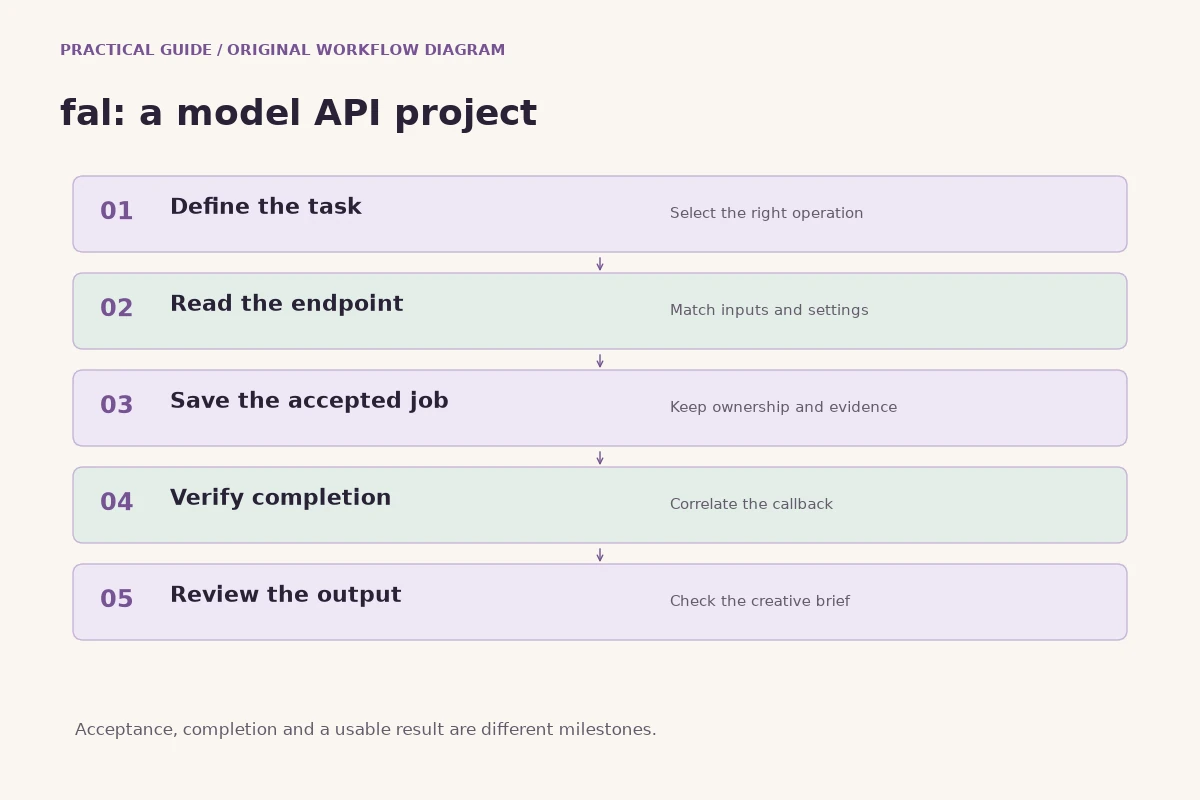
fal documents an asynchronous inference queue for model requests. The important product concept is that acceptance and completion are separate events. A service can accept a job before a result is ready. Your application should represent that state honestly, retain the request reference and show that the work is pending. A slow response does not by itself prove failure, and closing a browser tab does not establish that the accepted job has stopped.
Design the user experience around a saved job record rather than one fragile page interaction. If the user returns later, the application should be able to connect them with their own request and its confirmed outcome. Keep the distinction between an attempted submission, a known accepted request and a terminal result. This avoids a damaging ambiguity in which the interface displays failure while the external service continues processing an accepted chargeable operation.
8. Use verified callbacks to deliver completed results
A webhook allows a service to notify an application when an event occurs. For a generation project, a callback-driven design can separate the user's initial action from the later completion. Configure the callback according to the current documentation and verify its authenticity using the supported mechanism. Match the event to a saved request before changing the application record. The fact that an incoming message contains a plausible result URL does not establish which user owns it.
Handle repeated delivery safely. A callback may arrive again after a successful first delivery, so completing the same job twice should not duplicate assets or financial side effects. Save the verified evidence and make the completion operation idempotent. In a fictional poster application, one accepted request should produce one owned completion record even if the notification is received more than once. These are application design responsibilities; a webhook URL alone does not supply request correlation or user-level access control.
9. Separate uncertainty from a confirmed error
Network problems create uncertainty at several points. The application may lose a response after the service has accepted a request. A callback may be delayed, or a browser may disconnect while the server continues working. Describe those situations as unresolved when the evidence is unresolved. Automatically resubmitting the same creative job can create an additional accepted request and an additional cost without resolving what happened to the first one.
Build an operational process around saved identifiers and documented recovery procedures. A person investigating a stuck job should be able to see when submission was attempted, what acceptance evidence was retained and whether a verified terminal event arrived. Restrict recovery operations to authorised server-side components. Do not invent a completed failure, a zero cost or a refund from elapsed time alone. Clear evidence boundaries make a system easier to support than optimistic messages that later require the application to contradict itself.
10. Plan progress messages that do not mislead
A useful progress area explains what the user should do while the result is pending. It can say that the request has been accepted and that the application is waiting for completion. It should not show an invented percentage or claim that the model is performing a particular internal step unless that information is actually available. Honest uncertainty is easier to understand than a progress bar that reaches its final value and then stays there indefinitely.
Keep the user's input available while progress is displayed. If the connection is interrupted, do not replace a pending result with a demonstration image that looks like the user's output. Explain the connection state separately from the job state. A saved result should be presented as a saved result, with the relevant controls for review. The goal is a dependable relationship between the record and the interface, even when the underlying processing takes longer than a typical interactive page request.
11. Evaluate images beyond their first impression
Review generated images against the brief, not just against each other. A striking composition may still contain an incorrect product shape, inconsistent text or a detail that changes the intended meaning. Inspect the full image, important close-ups and the crop used in the final placement. For a product project, compare the result with the approved source photograph. If fidelity is essential, make that an explicit acceptance criterion rather than assuming that a reference will preserve every feature.
Keep a record of rejected results and the reason for rejection. This helps distinguish a prompt problem, an unsuitable source and a workflow that is simply a poor fit. A small review sheet can be more valuable than a large folder of unlabeled attempts. It also supports an honest decision to stop using a particular approach when repeated outputs fail the same essential requirement. The platform's flexibility is useful only when the project has a clear way to judge the material it produces.
12. Review generated video across time
A video result needs a full playback review. The first frame may look excellent while later frames introduce unstable objects, abrupt movement or a continuity problem. Evaluate the subject, camera, background and any audio across the entire clip. Consider the intended edit as well: a clip that looks acceptable alone may not join smoothly with neighbouring footage or leave enough space for the text and graphics used in the finished piece.
When comparing attempts, change the brief deliberately. If the motion is too complex, simplify the requested action. If the camera movement obscures the subject, make the camera instruction clearer. Keep the source material and relevant settings with each selected version. This creates a useful creative history and reduces the chance that a team mistakes a visually similar draft for the approved output. Video generation supplies footage; editorial decisions still determine whether that footage communicates the intended scene.
13. Understand model pricing as part of the endpoint contract
Generative media pricing can depend on the selected model and the work requested. Do not assume that every endpoint shares one unit, one rate or one relationship between runtime and charge. Read the current published pricing and any output-dependent conditions before estimating a project. Record which assumptions you used, such as quantity or the supported output choices, so the estimate can be revisited when those inputs change.
For an application, distinguish a planning estimate from a confirmed final charge. The user needs clear wording about what has been estimated and when a final amount is known. Avoid advertising a fixed per-project cost from one unusually small test. A useful budget includes the expected number of attempts and the review process that determines which attempts are worth keeping. Evaluate cost in relation to accepted usable outputs, while preserving actual billing evidence rather than assigning fictional costs to unresolved requests.
14. Control experiments with a small review matrix
A review matrix is a practical way to compare workflows without turning the project into an endless benchmark. Choose a few representative inputs and define the same acceptance criteria for each. Record the endpoint, relevant settings, result quality and observed limitations. Include ordinary working material, not only an exceptionally polished sample. The comparison should help a specific project choose its next step rather than declare one model best for every possible user.
A fictional agency might evaluate a background edit on three approved product photographs. It could record product fidelity, usable composition and whether the image fits the planned layout. Those observations are more actionable than an unexplained score. Keep cost and completion evidence alongside the creative notes, but do not confuse speed with quality. A quick result that repeatedly fails an essential requirement may be less useful than another approach that fits the brief with fewer revisions.
15. Preserve provenance and version information
Save enough information to understand how a selected asset was produced. The brief, source asset, endpoint identifier, submitted settings and output reference form a useful starting record. Record the date of the experiment and any later manual edits. This does not guarantee exact reproducibility, because services and models can evolve, but it gives future reviewers a concrete basis for understanding the work rather than relying on a vague description of an AI-generated image.
Separate the original generated file from the edited publication copy. If someone crops, retouches or combines material, label the resulting version accordingly. This helps a team answer practical questions about where a visible detail came from and which file should be updated. Provenance is especially useful when a project contains several similar drafts. The selected final asset should be identifiable without asking the original operator to remember which download looked slightly better on the day it was generated.
16. Check rights and publication needs independently
Access to a model does not automatically answer every question about the source material or the finished publication. Review the current model and platform terms relevant to the intended use, along with any rights attached to uploaded photographs, recordings or other assets. Where a recognisable person, brand or protected work is involved, use the project's ordinary permission and review process. This guide does not provide a legal determination for a particular asset.
The practical publication review should also check claims. A generated scene should not be presented as evidence of an event that never occurred. A fictional product concept should not imply that an unavailable feature is already for sale. If an asset is illustrative, make its role understandable in context. These decisions belong to the publisher and the project, even when the generation service successfully returns a technically valid file. A result can be valid as an API response and unsuitable as a public communication.
17. Build an operational dashboard around meaningful evidence
A useful job dashboard distinguishes pending work, confirmed completion and confirmed failure. It should let an authorised operator investigate a particular request without exposing another user's material. Show the saved submission time, request reference and verified events in a clear order. Avoid replacing missing information with guessed values. An unresolved cost, for example, should remain unknown until the relevant evidence exists, rather than being displayed as a reassuring zero.
Decide which actions an operator can take and what those actions actually do. Hiding an output from a user's view is different from cancelling an accepted external job. Deleting a local draft does not necessarily remove every external copy. Use the documented platform capabilities and the application's own retention policy to explain those distinctions. Operational clarity helps both support staff and users because the visible action matches the real state change rather than implying a broader effect than the system can verify.
18. Keep an application's access model separate from its catalogue
A public list of creative workflows can help visitors explore a product. It should not grant unrestricted submission authority or expose administrative settings. Separate read-only discovery from authenticated job creation and privileged configuration changes. When a person chooses a model, the server should still verify that the operation is available and that the requesting account is permitted to use it. A value supplied by the browser is a request to consider, not proof of ownership or entitlement.
Review result access with the same care. An unpredictable URL is not a complete access-control policy for private customer work. Decide which assets are public, which belong to a specific account and how temporary access is issued. Keep those decisions explicit in the application design and test them with separate harmless accounts or fixtures. The same request correlation that helps completion handling can also support correct ownership, provided it is checked at every relevant boundary rather than assumed from the interface.
19. Run a pilot before committing a whole production process
A small pilot should answer a practical question. Can the chosen workflow produce the required kind of output with acceptable review effort? Use a limited set of approved source material, a defined spending boundary and a clear stopping condition. Keep normal publication approval in place. The pilot is not successful merely because requests return files; it is successful when the team understands how to produce and review material that meets its intended need.
After the pilot, identify what remains uncertain. You may need better source preparation, a different endpoint, clearer prompts or stronger event handling. Address those findings before expanding access or volume. This creates a measured path from experimentation to use. It also gives the team a way to decide that a task should remain manual or use another workflow. A platform offers options, but a useful implementation selects and operates those options with a purpose.
20. A practical checklist for the next fal project
Begin with the deliverable, confirm the endpoint contract and prepare suitable source material. Build the smallest form that represents the supported task accurately. Keep credentials and authorisation on the server, save accepted request evidence and use verified completion handling. Define what the user sees while work is pending and how the completed output will be reviewed. These decisions make an initial experiment easier to turn into an understandable product.
Then evaluate the actual files, record the selected version and review the publication context. Recheck current documentation when changing endpoints, important settings or pricing assumptions. Avoid treating a previous demonstration as a permanent statement about every future model. The value of fal for a project comes from matching a documented capability to a concrete task and operating it reliably. A useful generation workflow is a complete chain from a clear brief to a reviewed, appropriately used result.
Sources and further reading
Explore technology and API guides
Compare messaging, creative model APIs, voice tools and communication workflows through the other independent Information Technology guides.
Explore Information Technology